Any movement that happens while your shutter is open will be recorded by the sensor. If something moves during that time, it won’t be rendered as a single sharp position but as a streak across the frame.

This is what we call motion blur. The faster the subject moves, the longer that streak becomes. Likewise, the longer the shutter stays open, the more time the sensor has to record that movement, and the stronger the blur will appear.
This post explains how to use shutter speed deliberately to show motion in a photograph, rather than freezing everything.
The best mode to put your camera in to show motion blur in a photo
The easiest way to control motion blur is to put your camera into S (Shutter Priority) or Tv mode.
In this mode, you choose the shutter speed and the camera automatically adjusts aperture and ISO to get a good exposure. That frees you up to think about how movement will appear, rather than juggling three settings at once.
As a rough guide:
-
Faster shutter speeds (e.g. 1/500s) reduce or eliminate blur
-
Slower shutter speeds (e.g. 1/30s, 1/10s, 1s) increase blur
If the image becomes too bright at slow shutter speeds, lower the ISO or make the aperture smaller. In very bright conditions, you may need an ND filter to keep shutter speeds slow enough.
Two different ways to show motion blur in photos
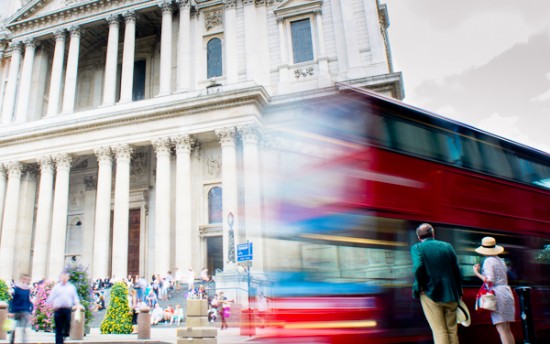
In this photo I used a shutter speed of 1/10s and the camera was held still. The bus moved a few metres in 1/10 of a second so this motion is shown as blur. The buildings in the background did not move and neither did the camera, so the buildings are sharp.
This works well for:
-
Traffic
-
People walking through a scene
-
Cyclists or trains
-
Water or clouds at much longer longer shutter speeds (you will need a tripod)
The key thing to watch is camera shake. If everything is blurred, it’s usually because the shutter speed is too slow to hand-hold reliably and teh whole photo is blurry and that’s not what we are looking for.
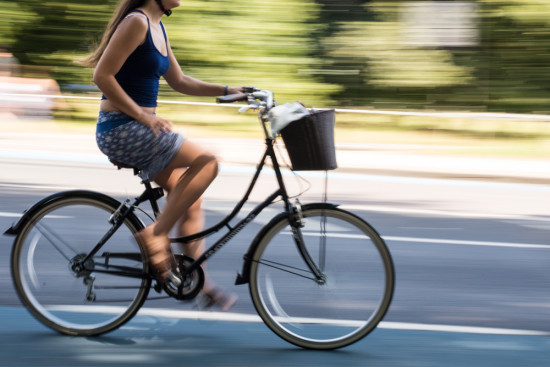
In this second photo I moved the camera to keep the cyclist at the same position in the frame. She remains sharp and it is the background that shows motion blur due to the movement of the camera. A shutter speed of 1/40s was used. This technique is called panning.
This technique is less predictable and takes practice. Start with shutter speeds around 1/30s to 1/15s, keep your movement smooth, and accept that most shots won’t work. When it does work, the sense of speed is much stronger than with a static camera.
How to think about creating motion blur in a photo
Motion blur is really about relative movement:
-
If something moves relative to the camera, it blurs
-
If it moves with the camera, it stays sharper
-
If nothing moves, nothing blurs and everything is sharp (if it’s in focus!)
Once you think in those terms, shutter speed stops being a technical setting and becomes a way of describing how time passes in the scene.

Andrew Mason is a professional photographer and the founder of the 36exp Photographers School plus the London Photo Show.
He shoots mainly commercial portraits for a living, and likes to shoot landscape, portrait and travel photography.
He is a master of lighting and portrait photography, plus leads photography trips with 36exp.